Resolving conflicts
When a merge, cherry-pick, revert, rebase or stash pop conflicts, the conflicted files stay in the Changes group. The group shows a badge such as 1 conflict, and each file is marked "(Conflicted)". A conflicted file opens the Resolve conflict pane:
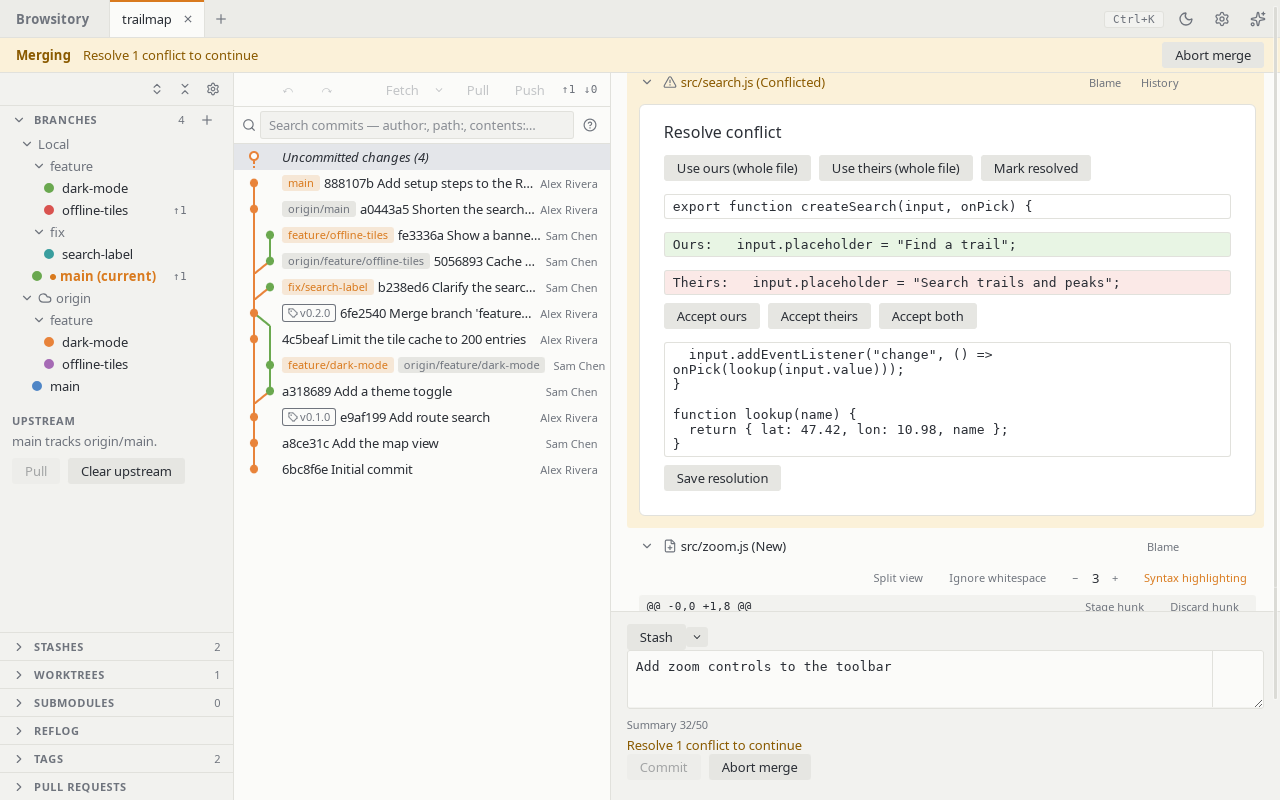
- For text conflicts, choose Accept ours, Accept theirs or Accept both for each conflicting block, then Save resolution.
- Use ours (whole file) keeps your current branch's version (HEAD) of the whole file and Use theirs (whole file) takes the incoming version: the commit being merged, cherry-picked or reverted, or the stash. During a rebase "ours" is the branch you are rebasing onto and "theirs" the commit being replayed. These work for every conflict, including binary files and files one side deleted (choosing the deleting side deletes the file). The file keeps the chosen side's executable bit. Symlink and submodule conflicts have to be resolved with git.
- Mark resolved stages the file as it is on disk, after you edited it yourself or in another
tool. If it still contains
<<<<<<</>>>>>>>conflict markers, Browsitory asks before staging it. A deleted file is marked resolved as deleted. - If the conflicted path is now a folder that holds a repository (a nested repository, a
submodule's checkout or a linked worktree), Mark resolved stages the commit that
repository has checked out, as
git adddoes. Browsitory only reads that repository's git folder when it is inside the work tree, for example a submodule's under.git/modules, and written with the same path as the work tree. When it can't stage the folder, it says why: the folder isn't a repository, the repository has no commit yet, its git folder (or a linked worktree's main repository) is outside the work tree, at a path Browsitory can't match to the work tree, or can't be found, or the repository uses a format Browsitory can't read (SHA-256, reftable). Stage such a folder withgit add <path>in a terminal.
If the conflicted file is read-only, Save resolution, Use ours (whole file) and Use theirs (whole file) change nothing and say so: "'f.txt' is read-only. Make it writable, then try again." Clear the file's read-only flag (Windows) or give yourself write permission (macOS, Linux), then try again. Choosing the side that deleted the file still deletes it.
Save resolution writes a complete new copy of the file next to it and then swaps it in. If
the write fails partway (for example on a full disk), the file stays as it was. On Windows, if
another program keeps the file open so it can't be swapped, Browsitory says "'f.txt' is open
in another program. Close it, then try again." and changes nothing. Because the file is
replaced, you need permission to create files in its folder. If the file is a hard link, its
other names keep the old content. If Browsitory stops in the middle of a write (a crash or a
power cut), a file named like .f.txt.browsitory-1234-0.tmp can be left next to the file
(hidden on macOS and Linux, visible on Windows); you can delete it.