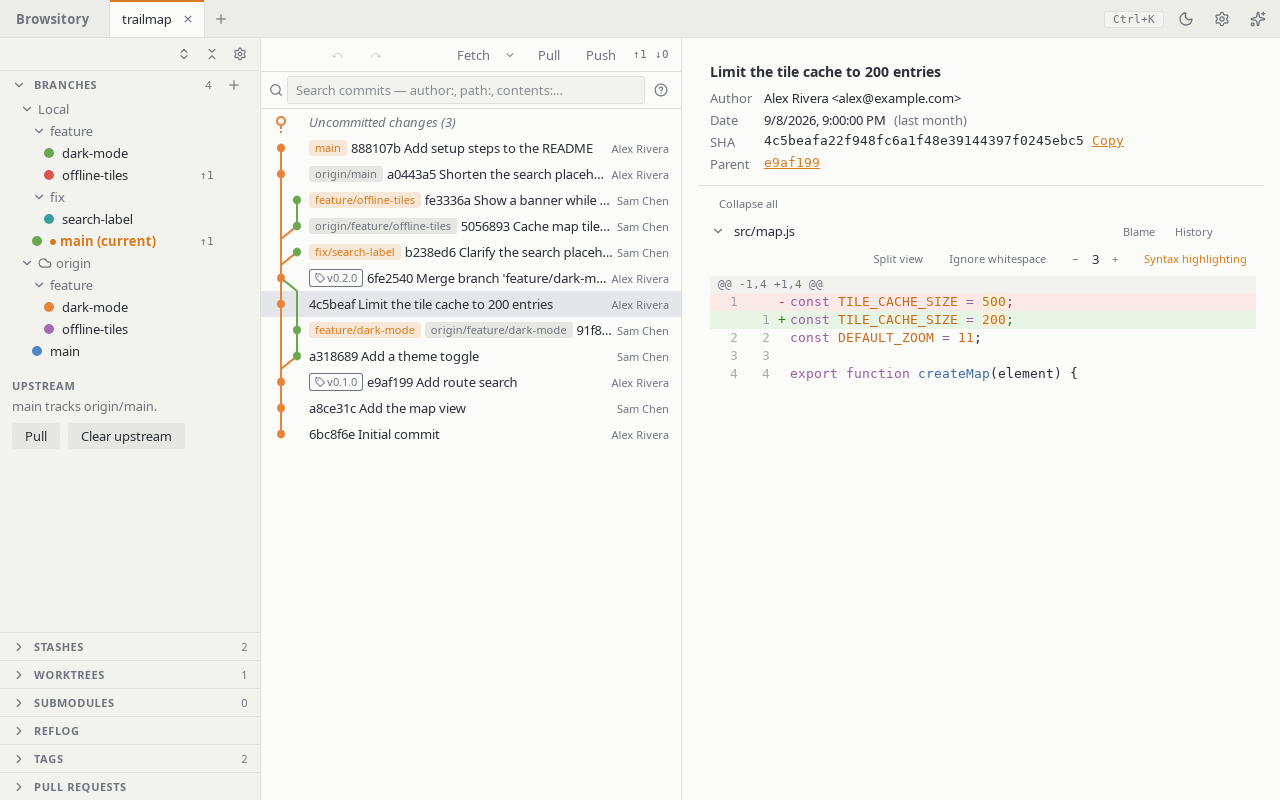
Branches and remotes
Branches is a single tree: a Local folder holding your local branches, and one folder per remote holding that remote's branches (fetched lazily the first time you expand it). Double-click a local branch, or choose Checkout from its context menu, to switch to it; right-click a branch, a remote folder, or a remote branch to bring up its actions:
- a local branch: checkout, rename, delete, merge, Push to…, Isolate branch, and for the current branch Set upstream… and Push to ⟨remote⟩;
- a remote branch: checkout, Set as upstream for current branch, or Delete ⟨remote⟩/⟨branch⟩…;
- a remote: fetch, Push current branch here, edit, manage credentials, or remove.
The + button in the section header opens New branch…, Add remote… and Show all branches. Creating a branch from a specific commit, or starting a rebase onto one, is available from that commit's row in the graph.
Upstream. The bottom of the section says which remote branch the current branch tracks ("main tracks origin/main."). Pull pulls from it. Clear upstream removes the setting (after asking); the branches themselves don't change. To set an upstream, use Set upstream… in the current branch's menu, or Set as upstream for current branch on a remote branch.
From the keyboard. Tab to a branch, a remote branch or a remote folder and press the Menu key or Shift+F10 (Fn+Shift+F10 on most Mac keyboards), or use its … button, to open the same menu. In any menu, ↑/↓, Home/End or a letter move between items, Enter or Space runs one, Esc closes the menu and returns to the row, and Tab closes it and moves on. The command palette also has Edit remote …, Manage credentials for … and Remove remote … for each remote; they open the same dialogs (Remove still asks first), even while the Branches section is collapsed.
Publishing a branch. Push to… pushes any local branch to a remote under any name.
The dialog asks for the remote (the branch's upstream remote, else origin), the remote
branch name (the local name by default) and Set as upstream, which is on by default for
a branch that has no upstream yet. The sync bar's Push opens the same dialog when the
current branch has no upstream, so a new branch is published in one step.
Where Push goes follows your git push.default (unset means simple). With simple, a
branch whose upstream has a different name — say feat, created from origin/main and so
tracking it — is not pushed onto main: Push opens Push to… with that remote and the
branch's own name instead. Set push.default=upstream to push to the upstream branch, or
current to push to the same name. With nothing, Push always asks. Force push follows the same
rule.
Ahead/behind. A local branch with an upstream shows ↑n (commits to push) and ↓m
(commits to pull) next to its name, counted against the last fetch. Nothing is shown when the
branch is in sync, or when its upstream has never been fetched.
Fetching every remote. The chevron next to Fetch opens Fetch all remotes and a
Prune toggle. Pruning removes remote-tracking branches whose branch was deleted on the
remote. The toggle is remembered per repository; until you set it, your git config
(remote.<name>.prune, then fetch.prune) decides per remote. If a remote fails during Fetch
all (unreachable, missing credentials), the others are still fetched and the error names the
ones that failed.
Merge options. Merge into current branch… opens a dialog naming both branches. Choose
Fast-forward if possible (move the branch when nothing diverged, else create a merge
commit), Always create a merge commit (even when a fast-forward was possible; the commit box
is pre-filled and the commit gets two parents), or Fast-forward only (refuse, changing
nothing, when the branches have diverged). Squash stages the combined changes of the branch
without committing and without recording a merge: HEAD does not move, the commit box is
pre-filled with the squashed commits' messages, and the commit you make has a single parent.
Undo reverts a squash. The dialog remembers your last choice per repository; until then it
follows your git merge.ff (false = always a merge commit, only = fast-forward only). The
Merge button of the "Pull has diverged" prompt always allows a fast-forward and does not ask.
Deleting a remote branch deletes it on the remote and removes its remote-tracking branch. Like every network operation, it can't be undone with Undo. Local branches that tracked it keep their upstream setting (git shows such an upstream as "gone").